AI Lip Sync Video Generator

AI LipSync Video Generator for Long Talking Videos

Make a talking video from a source image or video and your audio. InfiniteTalk AI LipSync keeps speech, lips, facial expression, and body motion moving together.

MP3,WAV,M4A,OGG,FLAC
Free

Want Multi-Character Conversations?

Create realistic dialogues with multiple speakers using Infinite Talk Multi AI

Preview

Definition

What is AI LipSync?

AI LipSync matches spoken audio to visible mouth movement, then renders a talking video from an image or existing clip.

Read more about AI LipSync

A basic lip sync tool focuses on the mouth. InfiniteTalk AI LipSync goes further by pairing lip movement with facial expression, head motion, posture shifts, and full-body movement. That makes AI LipSync useful when the person on screen should look like they are speaking naturally, not just moving their mouth.

For a creator, the workflow is simple: provide face media, provide speech, generate the video, and export the result. The category overlaps with talking avatar video, AI lip sync for dubbing, and audio-driven video generation.
Features

Key AI LipSync features for creators and teams

InfiniteTalk AI LipSync is built for people who need more than a short talking-head effect. It covers long clips, multiple input types, and natural motion.

Audio-driven face and body motion

InfiniteTalk AI describes its product as audio-driven video generation that syncs lips, facial expressions, head movement, and body motion. AI LipSync is stronger when the whole person reacts to speech instead of leaving the body frozen.

Image-to-video and video-to-video input

You can start from a single image plus audio, or use video-to-video lip sync when you already have footage. This makes AI LipSync practical for avatar explainers, product updates, training videos, and revised voiceovers.

Long-form talking video support

InfiniteTalk positions the product around infinite-length talking videos and long-sequence generation. This is a useful difference for creators who need lessons, podcast-style videos, or longer product walkthroughs.

Multi-speaker creation

InfiniteTalk AI Multi supports multiple characters with independent audio tracks and reference controls, so AI LipSync can support dialogue scenes where each person needs a separate voice.

Resolution and export choices

Choose the export resolution that matches your project. Use a faster lower-resolution draft while testing, then move to a sharper output when the voice, face, and timing are ready.

Browser-based creation flow

InfiniteTalk presents the creation flow on its public site, with upload, generation, preview, and download steps in the browser. That matters for AI LipSync buyers who do not want to install desktop editing software before testing a video idea.

Showcase

See AI LipSync examples in action

Browse real AI LipSync examples across ads, songs, multilingual clips, and talking avatar videos.

Workflow

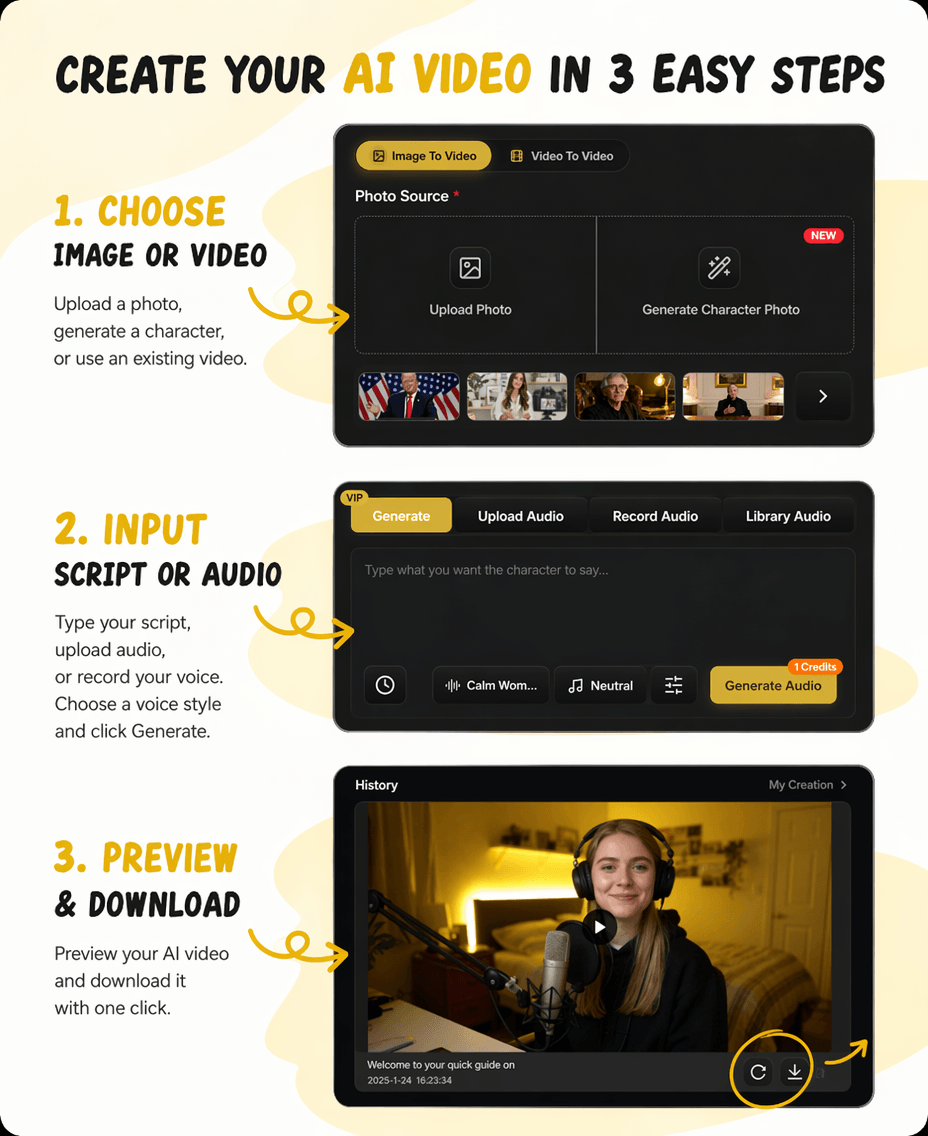
How AI LipSync works in 3 steps

You can make an AI LipSync video by preparing a clear face source, adding speech audio, then generating and downloading the talking video.

1

Upload a source image or video

Choose a clear image or video where the face is visible. InfiniteTalk supports image-to-video generation and video-to-video enhancement, so AI LipSync can start from either a still portrait or existing footage.

2

Add the audio you want the person to speak

Upload speech, narration, podcast audio, or dialogue. For better AI LipSync output, use clean audio without background noise.

3

Generate, review, and export

Generate the talking video, review the sync, then download the final clip. This workflow answers how to lip sync videos with AI and how to create AI lip sync video online free.

AI LipSync step by step example

Best results and credit cost

For best results, use high-quality images with clear facial features and audio with good clarity. The AI works better with frontal face images and clear speech audio. Maximum generation duration is 600 seconds.

Credit Cost: The minimum cost covers the first 5 seconds: 480P requires 5 credits, 720P requires 10 credits, and 1080P requires 15 credits. After that, credits are charged per second at the same rate.

Use cases

AI LipSync use cases for real video work

AI LipSync helps when you already have a face, voice, or script, and you need a finished talking video without a new shoot.

For creators making social clips

Use AI LipSync for TikTok and YouTube when you want a host, avatar, or character to speak a new line. This fits commentary, short explainers, memes, and recurring persona videos.

For educators and training teams

Turn lesson scripts, onboarding notes, and internal updates into talking avatar video. This helps teams refresh learning content without booking a new recording session every time the script changes.

For marketers updating product videos

When a product name, offer, or voiceover changes, AI LipSync can help create a revised clip from existing footage. This overlaps with AI lip sync for dubbing and localized marketing videos.

For interviews and two-person scenes

InfiniteTalk AI Multi is described as supporting multiple characters with independent audio. That makes AI LipSync relevant for podcast visuals, interview formats, and two-person AI lip sync dialogue videos.

For long-form explanations

InfiniteTalk positions itself around long talking videos. Use AI LipSync for lectures, walkthroughs, and story-driven updates where a short demo clip is not enough.

For localization teams

AI LipSync can help when one original video needs several language versions. You keep the same speaker image or footage, add translated audio, and generate a localized talking video.

For internal communication

Teams can use AI LipSync for policy updates, sales enablement clips, and onboarding messages where a consistent presenter is useful.

Compare

AI LipSync vs short lip sync tools

Many lip sync pages focus on quick mouth replacement. InfiniteTalk AI LipSync should be compared on motion scope, duration, and input flexibility.

This comparison does not mean every AI LipSync user needs InfiniteTalk. If you only need a quick single-speaker clip, several online tools may work. If you need long talking videos, full-body motion, or multiple speakers, InfiniteTalk is a closer fit.

Motion scope
AI LipSync can drive lips, expressions, head motion, posture, and body movement.
Input types
Use image-to-video or video-to-video workflows depending on the media you already have.
Longer videos
Use AI LipSync for long-form explainers, lessons, and walkthroughs.
Multi-speaker work
InfiniteTalk AI Multi supports multiple characters with independent audio tracks.

Why choose

Why choose AI LipSync from InfiniteTalk

Choose InfiniteTalk AI LipSync when the video needs to feel like a complete performance, not a pasted voice track over a still face.

Built for full-frame speech

InfiniteTalk describes sparse-frame dubbing that drives lips, head motion, posture, and expression. That gives AI LipSync a broader motion target than mouth-only editing.

Better fit for long messages

AI LipSync is a strong match for explainers, lessons, and podcast-style clips, not only short novelty videos.

Flexible enough for production changes

You can start from an image or from existing footage, then pair it with new audio. For teams, that means AI LipSync can update product demos, announcements, and training clips without scheduling another recording session.

FAQ

Frequently asked questions about AI LipSync

These answers address the main questions people ask before choosing an AI lip sync tool for talking videos, dubbing, or creator content.

Is AI LipSync the same as an AI Lip Sync Video Generator?

Yes. AI LipSync and AI Lip Sync Video Generator describe the same basic job: using AI to match speech audio with a face in a generated or edited video.

Can I create talking videos from any video or image?

Yes. You can use image-to-video or video-to-video workflows. For best results, choose an image or video where the face is clear and easy to track.

Can AI LipSync handle more than one speaker?

InfiniteTalk AI Multi is described as supporting multiple characters with independent audio tracks and reference controls. That makes AI LipSync suitable for multi-speaker scenes when the inputs are prepared correctly.

Do I need editing skills to use AI LipSync?

No advanced editing skill is required. Upload your image or video, add audio, generate the result, and review the output before you use it.

What makes InfiniteTalk different from a free AI lip sync video generator?

Free AI lip sync video generator pages often focus on quick clips. InfiniteTalk's main difference is its positioning around long talking videos, full-body motion, and both image-to-video and video-to-video workflows.

Is AI LipSync good for multilingual videos?

AI LipSync can support multilingual videos when you provide suitable translated audio. You can keep the same speaker image or footage while creating versions for different markets.

What input quality works best?

Use clear speech, a visible face, and stable framing. Clean audio and a well-lit face usually produce a more natural lip sync result.

Get started with AI LipSync

Bring your image, video, and audio into InfiniteTalk, then generate a talking video you can review, download, and use in your next project.

Use AI LipSync for creator clips, product updates, training videos, localized messages, and long talking avatar content.