To compare InfiniteTalk vs OmniHuman 2.0, we gave both models the same portrait, the same 10-second speech clip, and the same settings: 720p, no text prompt, one attempt each. Then we repeated the test with a second portrait. All four runs succeeded on the first try and cost 22 credits each.
Here is what we saw:
In the test where the hands were in frame, InfiniteTalk added more head and body movement, including two-handed gestures.
OmniHuman 2.0 kept a steadier frame, and its last frame stayed very close to the input portrait.
InfiniteTalk’s videos ran 10.04 seconds; OmniHuman 2.0’s ran 11 seconds.
In one test case, InfiniteTalk appeared to close its mouth early on the final word.
Our pick: Based on these two test cases, we’d try OmniHuman 2.0 first for a portrait-based presenter video. It kept a steadier frame, stayed closer to the original face, and its ending in Test B looked cleaner to us. For re-voicing existing footage, start with InfiniteTalk, since the OmniHuman tool we used starts from a still image.
Below are the original videos, frame comparisons, and what each observation does and does not tell you. A note on terms: a model and the website that runs it are different things, so we keep model specs and hosted-tool limits in separate tables.
Our Same-Input InfiniteTalk vs OmniHuman 2.0 Test
We ran all four jobs on October 20, 2026, through the browser tools linked in this article.
Inputs and Settings
Test A portrait: a man in a white shirt in a sunlit office, both hands in frame (AI-generated, 1820×1024)
Test B portrait: a woman in a beige hoodie in a pink studio with a neon LIVE sign, hands out of frame (AI-generated)
Audio: one 10.05-second English speech clip (M4A), used for all four runs
Settings: 720p, empty prompt, one generation per model, no retries
Both portraits and the audio clip are default samples from the OmniHuman tool’s library. We used the identical files on both sites, but samples chosen by one tool’s site may suit that tool, so keep this in mind when reading the results.
Results
Result | InfiniteTalk | OmniHuman 2.0 |
|---|---|---|
Successful runs | 2 of 2 | 2 of 2 |
Output resolution | 1280×720 | 1280×720 |
Output length | 10.04 s (both tests) | 11 s (both tests) |
Credits per run | 22 | 22 |
Time until ready (A / B) | About 3.5 min / about 4 min | About 3 min / about 3 min |
Ready times come from periodic checks, not server logs, so treat them as rough bounds rather than a speed ranking.
Watch the Original Outputs
Original 1280×720 outputs, unedited. Click a thumbnail to play.
Test A
InfiniteTalk | OmniHuman 2.0 |
|---|---|
Test B
InfiniteTalk | OmniHuman 2.0 |
|---|---|
Frame Comparisons
Each pair shows the two outputs at the same timestamp. Frames show the full 1280×720 picture at 50% scale.
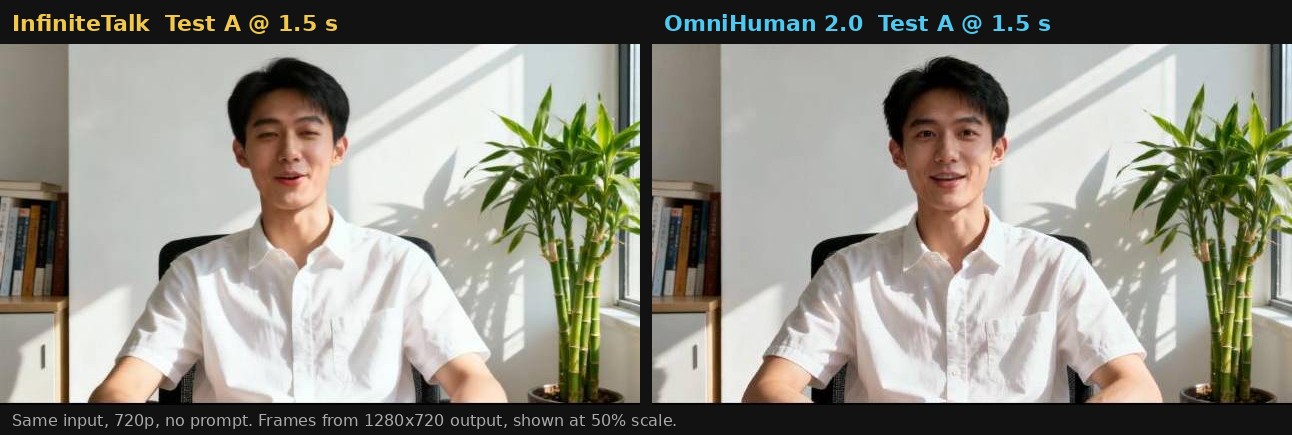
Test A at 1.5 s: both faces stay close to the input portrait, mouths open mid-word.
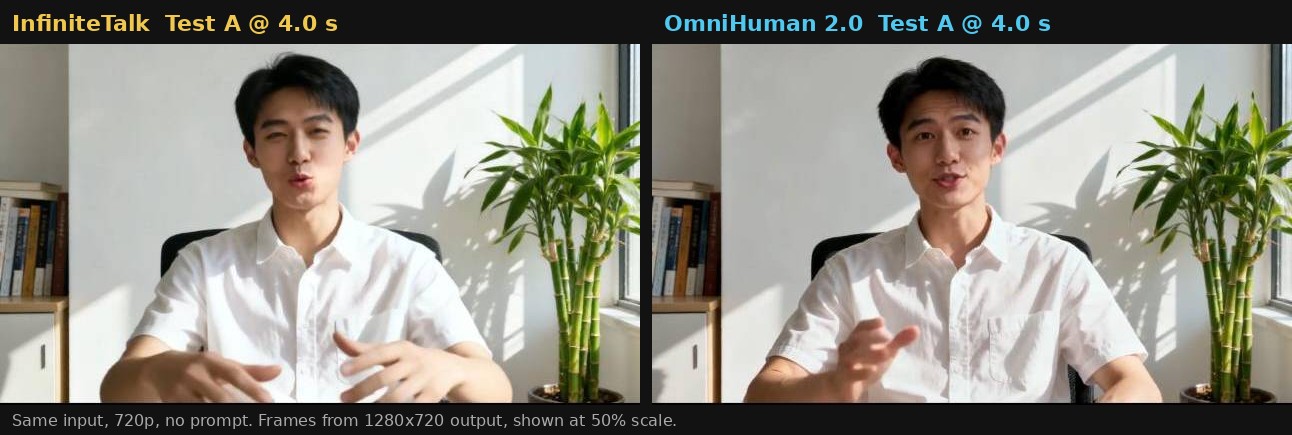
Test A at 4 s: InfiniteTalk gestures with both hands, while OmniHuman 2.0 points toward the camera with one.
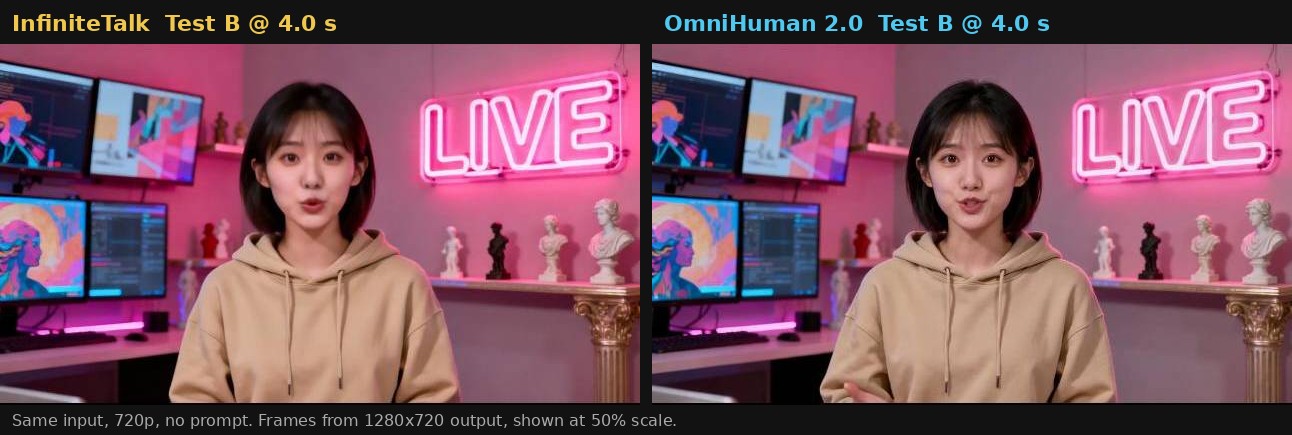
Test B at 4 s: the input portrait has no hands in frame, yet OmniHuman 2.0 brings a hand in at the bottom edge.
Movement and Gestures
Neither model received a prompt, yet both went beyond moving the mouth. In Test A, InfiniteTalk’s character leans forward, tilts his head, and gestures with both hands. OmniHuman 2.0’s character points toward the camera, opens his palms, and later clasps his hands, while the framing stays steadier.
In this sample, OmniHuman 2.0’s movement looked more restrained to us. Neither style is better in general. We liked InfiniteTalk’s energy for a casual explainer and OmniHuman 2.0’s calmer delivery for a corporate presenter.
Mouth Movement and Lip Sync
We watched every clip with sound and stepped through the endings frame by frame. It helps to separate two things here.
How the mouth looks. In both tests, OmniHuman 2.0 opened the mouth wider and showed more teeth on open vowels. That is a subjective preference, but we liked its mouth movement more in both test cases.
Whether the mouth matches the audio. In Test A, we did not see a clear timing difference between the two. Test B showed one difference at the end. On playback, InfiniteTalk’s mouth seemed to close while the final word was still sounding. Stepping through the frames, InfiniteTalk’s mouth is closed in a smile by 9.9 seconds, while OmniHuman 2.0’s mouth is still open at the same moment. The audio waveform shows activity continuing to about 10.05 seconds. The face crops below are enlarged 2x.
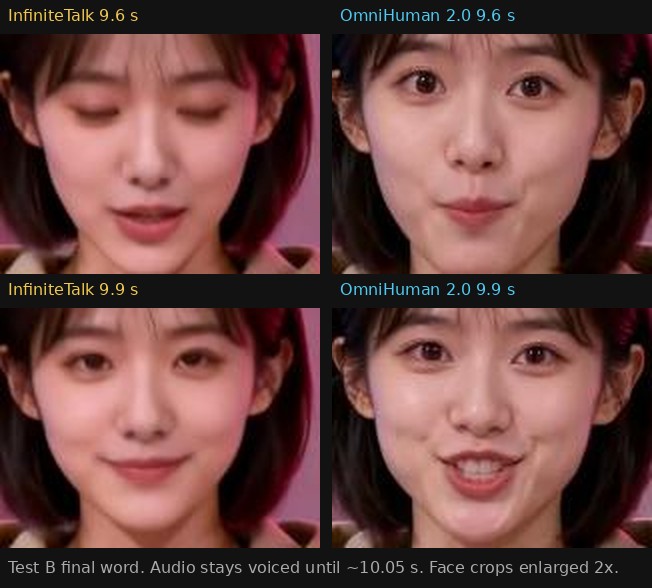
Test B final word: at 9.9 s, InfiniteTalk’s mouth is closed while OmniHuman 2.0’s is still open.
InfiniteTalk appeared to close its mouth early on the final word. Closed lips can be correct for some sounds, so we treat this as a playback impression rather than a measured sync error.
Identity and Background
Both models kept the backgrounds stable, from the bookshelf and plant in Test A to the monitors and LIVE sign in Test B. OmniHuman 2.0’s final frame in Test A almost matches the input portrait. InfiniteTalk’s face shape shifted briefly during one larger head turn in Test A before settling back.
Output Length and Cost
InfiniteTalk’s outputs ran 10.04 seconds, close to the 10.05-second audio. OmniHuman 2.0 added about one second, and on playback that extra time appeared after the speech ended. If the clip must fit a fixed slot, check the ending and trim the tail.
Both tools charged 2 credits per second at 720p and billed the 10.05-second clip as 11 seconds. As a result, the 20 free credits a new account receives on the OmniHuman tool would not cover even this short sample.
What Is InfiniteTalk?
InfiniteTalk is an open-source audio-driven video model from Meituan’s MeiGen team, described in the paper InfiniteTalk: Audio-driven Video Generation for Sparse-Frame Video Dubbing. Its core idea is sparse-frame video dubbing. Instead of editing only the mouth, it keeps a few reference frames to preserve the person, gestures, and camera movement, then regenerates motion so the face, head, and posture follow the new audio.
It works in two modes:
Image-to-video: a portrait plus audio becomes a talking video. This is the mode we tested.
Video-to-video: existing footage plus new audio becomes a re-dubbed video.
What Is OmniHuman 2.0?
OmniHuman 2.0 is the latest model in ByteDance’s OmniHuman digital human family, offered through BytePlus. According to the BytePlus product page, it generates video from a single image plus audio, with an optional text prompt for actions and camera movement. BytePlus also says the model responds to the rhythm, intonation, and meaning of the speech, not just its timing.
We left the prompt empty, so our test says nothing about how closely OmniHuman 2.0 follows directions. The OmniHuman tool we used states on its own site that it is an independent service, not ByteDance or BytePlus.
Model Specs
Spec | InfiniteTalk | OmniHuman 2.0 |
|---|---|---|
Developer | MeiGen-AI (Meituan) | ByteDance, via BytePlus |
Base model | Wan2.1-I2V-14B-480P, listed in the InfiniteTalk repository | Not publicly disclosed |
Access | Open weights under the Apache 2.0 license (model card) | Commercial API |
Resolution | 480P or 720P (repository) | 720p output (BytePlus product page) |
Length | Streaming generation; image-to-video described as good up to about 1 minute (repository) | 30 to 300 seconds per video (BytePlus product page) |
Multi-person | Separate multi-person weights (repository) | Multi-person scenes (BytePlus product page) |
Price | Free weights; you pay for compute | $0.07 per second, listed with 30 to 300 s output (BytePlus product page) |
OmniHuman 2.0 became available on BytePlus on October 15, 2026, according to launch coverage on Webrazzi. The BytePlus page also shows a separate lip sync option at $0.12 per second, so confirm which option applies to your use case.
Hosted Tools We Used
Limit | InfiniteTalk tool | OmniHuman tool |
|---|---|---|
Resolution menu | 480P, 720P, 1080P | 720p |
Maximum per job | 600 seconds | 300 seconds of audio (minimum 4) |
Rate at 720p | 2 credits per second | 2 credits per second |
Billing | Minimum charge covers 5 seconds | Rounded up to the next second |
These limits were displayed on each tool’s page on October 20, 2026, and can change.
Beyond Our Test: Capabilities to Weigh
Our test cases covered short, single-speaker portrait animation. These InfiniteTalk vs OmniHuman 2.0 differences come from each model’s design, not from anything we measured.
Dubbing Existing Video
If you need to re-voice footage, such as an interview, a product demo, or a translated course, InfiniteTalk has a video-to-video mode built for it. BytePlus describes OmniHuman 2.0 as working from a single image, and the OmniHuman tool we used starts from a still image too, so it is not a direct substitute.
Long Videos
OmniHuman 2.0 caps each video at five minutes, while the InfiniteTalk tool we used accepts ten-minute jobs. A longer limit does not guarantee a better long video. The InfiniteTalk repository notes that color shifts become more noticeable in image-to-video beyond about a minute, and its video-to-video mode only approximates the original camera movement. Review the middle and end of any long clip from either model.
Multi-Person Scenes and Prompts
Both models list multi-person support, and OmniHuman 2.0 adds prompt control for actions and camera moves. We tested neither, so try them with your own material first.
Cost at Scale
At the listed $0.07 per second, OmniHuman 2.0 works out to about $4.20 per minute with nothing to host. InfiniteTalk’s weights are free, which moves the cost to GPU time and setup if you run it yourself. Whether that is cheaper depends on your volume and hardware. The fairest number is cost per usable clip: total spend divided by the clips you keep, retries included.
InfiniteTalk vs OmniHuman: Which Should You Try First?
Your project | Try first | Basis |
|---|---|---|
Re-dubbing existing footage | InfiniteTalk | Documented video-to-video mode |
Casual, animated presenter | InfiniteTalk | More movement in our Test A |
Calm presenter from one photo | OmniHuman 2.0 | Steadier framing in our tests |
Script longer than five minutes | InfiniteTalk | Longer per-job limit on the tool we used |
Directed actions or camera moves | OmniHuman 2.0 | Documented prompt control, not tested |
Self-hosted or private workflow | InfiniteTalk | Open weights |
How to Test With Your Own Material
Our two test cases are a starting point, not a verdict. Before you commit:
Use a front-facing portrait with visible hands and a 30 to 60 second clip with a change in tone.
Check p, b, and m sounds, pauses, and the last word of each sentence.
Compare the final frame with the input portrait to spot identity drift.
If you need long videos, run one clip longer than a minute.
Spend your first credits on the part most likely to expose problems, such as a pause, a tone change, or a tricky final word. In our tests, the final word was worth a closer look.
Test your clip on InfiniteTalk
Final Thoughts on InfiniteTalk vs OmniHuman 2.0
Our pick: Based on these two test cases, we’d try OmniHuman 2.0 first for a portrait-based presenter video. It gave steadier framing, a face closer to the original, and an ending we were happier with in Test B, at the same credit cost as InfiniteTalk. For dubbing existing footage, start with InfiniteTalk.
There are good reasons to reverse that choice. Pick InfiniteTalk for a photo-based video if you want livelier movement, output closer to the audio’s length, longer jobs, or a self-hosted workflow. Either way, try a few lines from your own script on both before you commit.
Test your clip on OmniHuman 2.0
FAQ
What is the main difference in InfiniteTalk vs OmniHuman 2.0?
InfiniteTalk is an open-weight model that animates a portrait or re-dubs existing video. OmniHuman 2.0 is ByteDance’s commercial model that animates a portrait from audio, with an optional text prompt, for up to five minutes per video.
Which had better lip sync in your test?
We saw no clear timing difference in Test A. In Test B, InfiniteTalk appeared to close its mouth early on the final word, while OmniHuman 2.0’s mouth was still open at the same moment. Two short test cases are not enough to rank overall accuracy.
Is InfiniteTalk free?
The weights are free under the Apache 2.0 license, but running them takes GPU compute. Hosted tools charge separately; the one we used charged 22 credits for a 10-second, 720p clip.
How much does OmniHuman 2.0 cost?
The BytePlus product page lists OmniHuman 2.0 at $0.07 per second with 30 to 300 seconds of output, and shows a separate lip sync option at $0.12 per second. Hosted tools set their own credit prices; the one we used charged 2 credits per second.
Which should I use to dub an existing video?
Start with InfiniteTalk. Its video-to-video mode keeps the original person and scene while regenerating motion for the new audio, whereas the OmniHuman tool we used starts from a still image.